@admin — following
Follow buttons here act as you, not as @admin.
@admin follows
| Label | Kind | State | Action |
|---|---|---|---|
| @ricardo | local | — | |
| @rmdes | local | — | |
| @paul | local | — | |
| news.rss.chat | source | — | — |
| scripting.com | source | — | — |
| euwatch.micro.blog | source | — | — |
| www.techdirt.com | source | — | — |
| simonwillison.net | source | — | — |
| www.manton.org | source | — | — |
| feeds.kottke.org | source | — | — |
| rss.beehiiv.com | source | — | — |
| www.404media.co | source | — | — |
| brilliantmaps.com | source | — | — |
| shellsharks.com | source | — | — |
| www.platformer.news | source | — | — |
| podstandards.org | source | — | — |
| zacharykai.net | source | — | — |
Timeline
-
How to create a standard, 2026 addition
Reply sourceTL;DR: What developers need. Enough examples, a validator, and decent docs that value explaining over mathematical elegance. We assume developers can read and think, and if there's doubt look to the examples for guidance.
It's worth noting we did not take the RSS.chat project to a standards body like the W3C or the IETF. I develop the software first, make sure I'm happy with it, then open it up for other developers to try out, either building something compatible (a reader) or competitive (a writing environment). Hopefully we won't find major problems, but if we do, there's still time to address them.
I find that most standards that come out of the standards bodies aren't developed by implementors or with them in mind. They avoid trying to solve any specific problem, rather focusing on the elegance and flexibility of the format. This makes interop much less likely.
I saw the differences several times as the web standards were growing up. The ones that were taken over by the W3C ended up missing the point. They could still be used, but they often did anti-interop things in their design. But if they get popular we will build on them anyway. A great example was XML-RPC vs SOAP. We didn't need another way to do RPC on the web, we already had a good one. We didn't need another syndication format, RSS was growing like a weed. We didn't need an alterative to rssCloud, but we got one anyway.
It's as if they forgot that the internet and web were not build by big corporations, who were busy fighting over Windows vs Mac OS. Lotus vs Excel. The internet was built mostly by individuals at universities. The internet caught the tech industry by surprise. So it's no wonder the formats they built were anti-internet. Long story, the point is we're building stuff is mimimalist yet still does a lot of great things. And there won't be a lot of long mathematical sounding definitions, but there will be plenty of examples and a validator, the tools developers need to create interop.
PS: This piece was added to Rules for Standards-makers (2017).
-
Is Education About Native American Heritage & History Required by Your State Constitution?
Montana’s Indian Education for All, commonly shortened to IEFA, is unusual because it rests on both the state constitution and ordinary legislation. Article X, Section 1(2) of Montana’s 1972 Constitution states: “The state recognizes the distinct and unique cultural heritage of the American Indians and is committed in its educational goals to the preservation of […]Reply source - Reply source
Last week along with a lot of other stuff, we shipped a validator for lists and feeds that want to be compatible with RSS.chat. It works best for standards to stay strong and a validator helps that. So here are a few examples, validating one user's feed, validating the everyone feed for RSS.chat, which is interesting because this feed starts a lot of threads, so we navigate through that tree and check those feeds too. And validating the user list on RSS.chat, which is an OPML file. And a simple feed with a few interop isses.
-
Gavin Newsom Makes An Ass Of Himself On Antitrust, Paramount Merger
It’s hard to not have noticed that a key enabler of U.S. authoritarianism was our consolidated corporate media, which (with scattered exception) was more than happy to throw the entirety of journalistic integrity in the toilet for a chance to please a mad, idiot king. In large part because our press is increasingly owned by […]Reply source -
Sony Gives Its Disc-Loving Customers A Giant Middle Finger
Just a few weeks ago, Sony announced that it would stop producing games on physical media starting in 2028 and a very loud portion of Sony’s customers lost their freaking minds. And, in this writer’s opinion, for very good reason. Having no physical media option for your games is going to make game preservation efforts […]Reply source -
Notes on the third era of slop
Some platforms are turning against AI-generated content. Others are embracing it. What gives?Reply source -
Judge To xAI: If This Law Is So Urgent, Why Did You Wait Three Months To Sue?
Last week we wrote about how Elon Musk’s xAI had filed a lawsuit to attempt to block Minnesota’s anti-nudify app law. As we tried to explain, even if you (reasonably, understandably) dislike both Elon and “nudify” apps, there were real problems with the Minnesota law. In particular, it was not narrowly tailored to just target […]Reply source - Reply source
I made a change today for new users to essentially require setting the "about me" text for a Micro.blog profile. After you confirm signing up, you'll get this page with some random profiles. I hope that it'll help with discovery in the future and also weeding out non-humans more easily.
-
“Long live Hyrule jazz!” The Z Suites is “a...
Reply source“Long live Hyrule jazz!” The Z Suites is “a modern jazz reinterpretation of the music from The Legend of Zelda”.
-
The SCREEN Act Threatens Privacy Far Beyond Adult Websites
The Senate Commerce Committee is set to consider S. 737, the SCREEN Act, a sweeping age-verification bill that would require online services to verify users’ ages before they can access any sexually explicit content. If this bill passes, it will force millions of adult internet users to give up their anonymity, privacy, and security before they […]Reply source -
How Podcasts Ruined America . This is an odd claim and...
Reply sourceHow Podcasts Ruined America. This is an odd claim and article. No mention of the clear precursors to right-wing podcasts (talk radio, blogs, Twitter) and the general shift towards less accountability for public speech, esp. by conservatives. 🤔
-
Pilcrow, Dagger, and Octothorp, Oh My!
Reply sourceSo, I don’t know what kind of nerd you are, but my brand of nerdiness dovetails neatly with this video about the origins of some of the most common symbols on your keyboard: #, @, &, §, *, ¶, †, and ‡, as well as ☞.
The “and” symbol or ampersand does not look like a word, but it is one. In fact, it is a full one. It is the Latin word for “and”: “et”. The Romans themselves used this. How do we know? Because we have this: the earliest known example of it, graffitied onto a wall in the doomed Roman city of Pompeii.
-
DOJ Dumps Reflecting Pool Charges, Admits It Was All The Fault Of Trump’s No-Bid Pool Guys; While Trump Sticks By His Vandalism Story
Hail to the Chief. Our country is being run by paranoid conspiracy theorist megalomaniac who openly wishes to kick-start America’s first autocracy. Nothing that goes wrong is ever the president’s fault. It’s always the fault of officials with insufficient loyalty or the criminal acts of people out to get him. Trump decided the Lincoln Reflecting […]Reply source -
Daily Deal: Rosetta Stone Sapphire 1-Year Subscription
Rosetta Stone Sapphire combines over 30 years of language-learning expertise with immersive technology designed to help you speak naturally and confidently in real-world situations. Trusted by millions of learners worldwide, Sapphire brings together structured lessons, pronunciation coaching, conversation practice, flashcards, and personalized learning tools in one complete platform. Built around Rosetta Stone’s proven Dynamic Immersion […]Reply source -
What Climate Science Can Tell Us About the Lost World...
Reply sourceWhat Climate Science Can Tell Us About the Lost World That Inspired The Odyssey. “A new climate study suggests that centuries of repeated severe drought added to the pressures on that collapsing world.”
-
‘Own the Narrative’: Leaked Flock Guide Shows How It Teaches Cops to Promote Its Tech
"This document shows a coordinated effort from Flock Safety to compel law enforcement agencies to convince our elected leaders to represent their interests as a company rather than the interests of concerned citizens."Reply source -
This is fun: BoxSquad . Limbs & borders are all draggable.
Reply sourceThis is fun: BoxSquad. Limbs & borders are all draggable.
-
Trump Spends The Weekend Fighting For The $1.776 Billion Slush Fund His Chosen Attorney General Swears Is Dead
Sometimes it helps to just write out everything that happened leading up to a situation so we don’t lose sight of just how ridiculous it is. I mean, would you believe that a President would sue his own IRS for something that happened under his own watch and did him no harm, demand $10 billion, […]Reply source -
“A Los Angeles Costco parking lot [has] become a...
Reply source“A Los Angeles Costco parking lot [has] become a hotspot for skaters over 40. Its long, low curb lets us keep doing tricks on safer, lower-risk terrain […] Curbs represent the twilight of skateboarding, the end being closer than the beginning.” Lovely.
-
AI news without using X
sourceI've mentioned a few times how the AI community is overwhelmingly still using X. This is annoying because I'm fascinated with AI, and I like to know throughout the week what big changes are happening in the industry.
I stopped posting to Twitter over a decade ago. And more recently with Elon Musk, the X API has become more unpredictable and developer-hostile. (I still think Micro.blog should probably integrate with it anyway, so that users can prioritize their own blogs and still reach social followers with POSSE, but it's a question I've tabled for now.)
I had even gotten into the habit of routinely checking X posts from folks in the AI industry. I really dislike this. There has to be a better way to keep up with news. Blogs like TechCrunch help, but only if an X post becomes important enough to bubble up to a broader audience.
Over the last few weeks, I've been testing a new solution using ChatGPT scheduled tasks. I have a task that can run at regular intervals, finding any relevant posts and summarizing them for me. The prompt looks like this:
Find the latest public posts/tweets from notable OpenAI and Anthropic employees, summarize the most important updates, and include links to the original posts. Prioritize posts from the last 8 hours and focus on AI product, research, developer, policy, and company-relevant updates.
It's working well. Here's a screenshot from ChatGPT from over the weekend:
I don't actually know how this works behind the scenes. I assume it's downloading various profile pages while navigating around the dickovers that increasingly get in the way of signed-out reading on platforms like X and Reddit. But however it's doing it, it works. It finds both X posts and company blog posts from OpenAI and Anthropic.
The larger point isn't really about X. This workflow is just a specific example of what will become more common in the future, as AI assistants proactively help us save time, just as RSS feed readers help us avoid reloading a website home page over and over.
Social media powered by ads and algorithms is too addictive. The best way to avoid it is to not check mainstream social media at all, otherwise we're inevitably going to get sucked into the infinite timeline. I think RSS feed readers and AI assistants will have an important role to play in helping us stay informed even as we're mostly unplugged from the worst aspects of it all.
-
Does Christopher Nolan Consider Himself a Bard for a Civilization at Dusk?
Reply sourceThis 17-minute interview about the Odyssey with Christopher Nolan conducted by philosophy doctoral student Zhong Shu is one of the better ones I’ve seen.
The first two questions are:
- Do you consider yourself a bard for a civilization at dusk?
- Have you Christianized The Odyssey?
And nary a comment or question about filming in IMAX.
Tags: Christopher Nolan · film school · interviews · movies · The Odyssey · video · Zhong Shu
- Reply source
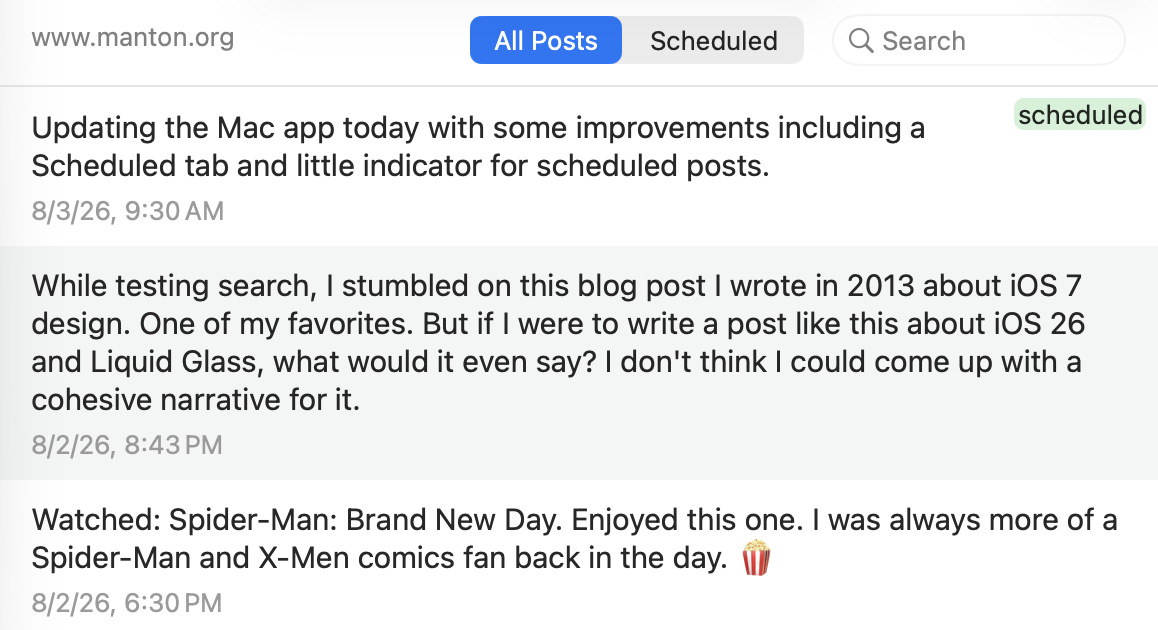
Updating the Mac app today with some improvements including a Scheduled tab and little indicator for scheduled posts.
-
Why a Flock Worker Quit: ‘They Lied’
Jonathan Paz’s job was to convince cities to buy Flock cameras. After initially being enthusiastic about the company, he started to get disillusioned.Reply source - Reply source
We need a way to define lists of writers independent of the site they write on. They are represented by an RSS feed with the basic features required for RSS.chat. The list is an OPML subscription list. We're reusing formats people are already familiar with, RSS and OPML.
-
Google Earth stupidly launched an AI image-gen feature...
Reply sourceGoogle Earth stupidly launched an AI image-gen feature with no guardrails then put it on pause after a huge outcry. “Tonight I typed just one sentence into Google Earth and put refugees near the Mexican border. Then I planted a nuclear plant in Iran.”
- Reply
ATOM vs RSS - Genuine question for anyone that sees this:
Is one of them better or does it depend on what you’re using it for?
-
The Listening Museum : “36 mechanical keyboards...
Reply sourceThe Listening Museum: “36 mechanical keyboards and switches, curated and sound-mapped. From IBM Model M (1985) to Topre to thocky modern customs. Click any card, type on your real keyboard, hear it as if it were on your desk.”
-
Trump’s Sloppy, Incompetent Chinese Protectionism Expanded To Robot Vacuums, Lawnmowers
Ideally, I think it makes sense to open up the U.S. market to Chinese goods (AI, EVs, robots), but have functional and well-funded regulators that policy all labor, competition, environmental, privacy, and consumer rights abuses. But big companies don’t much like that because it would boost competition and accountability, eroding quarterly revenues. So instead we […]Reply source - Reply source
While testing search, I stumbled on this blog post I wrote in 2013 about iOS 7 design. One of my favorites. But if I were to write a post like this about iOS 26 and Liquid Glass, what would it even say? I don’t think I could come up with a cohesive narrative for it.
- Reply source

Watched: Spider-Man: Brand New Day. Enjoyed this one. I was always more of a Spider-Man and X-Men comics fan back in the day. 🍿
-
Funniest/Most Insightful Comments Of The Week At Techdirt
This week, both our winners on the insightful side come in response to the protestor who is charged with destroying property for giving CBP agents the “duress mode” password to wipe his phone. In first place, it’s an anonymous comment extending our characterization of what the DOJ is doing here: While simultaneously pushing to institute […]Reply source - Reply source
 Taking some time off to breathe and regain perspective. Fixed a few bugs, and wrote about the big picture on demo.rss.chat. I really want to get a project going to peer with standard.site apps running in AT Proto, both ways, from us to them, and from them to us, via RSS. We can peer with them because as far as I can tell they implement textcasting. This bridge would demonstrate something important. When something interesting shows up not based entirely on web standards, we're flexible if the attraction is strong enough. This is how the internet came to be. Our systems are prepared to create bridges. And unlike bridging between systems that have different ideas of what text is, which are basically hopeless, if we agree that the web standard for text is fine for writers and reader, better than the ridiculous limits imposed by twitter-like systems. Writing on the web has been crippled since Twitter, now let's start building it back up. That's the appeal of standard.site, they are working toward the same goal. We should work together.
 - Reply source
This new app status page I created this weekend really highlights the madness of maintaining a suite of apps. 13 separate native app releases. 8 code bases.
- Reply source
“Your father didn’t believe in revenge.”
“Yeah, well, I do.”
— Dune: Part 2 - Reply source
New poll has James Talarico up 5 points. From the Texas Tribune:
Since Paxton locked up the GOP nomination in late May, polling of the contest has found a neck-and-neck race with neither candidate able to break 50%. But TPOR’s poll found Talarico leading among voters who do not have a college degree — a group that has consistently favored Republicans in Texas and across the country — and dominating among independents, less than a quarter of whom said they planned to vote for Paxton.
🇺🇸
- Reply source
Doing a little work this morning, fixing bugs. It’s a 10-minute All Too Well kind of playlist morning. 🎶
- Reply source
Little purple flowers popping up.

- Reply source
We have so many apps now, I’ve created yet another page with a table of apps across platforms and the current versions. The key improvement is it automatically updates with info from App Store Connect about whether there’s a new version in the queue.
-
This Week In Techdirt History: July 26th – August 1st
This Week in 2016 This Week in 2011 This Week in 2006Reply source - Reply source
The month of July is history. A fine month. A coral reef was seeded.
- Reply source
I’ve been working on cross-platform mobile apps so much recently, had a funny moment while improving some things in Sunlit where I thought, “But how is this going to look on Android…” It’s not! iOS-only Swift app.
-
We Need to Quarantine Aliens on the Moon, Scientists Propose
Researchers argue that a lunar biocontainment facility for extraterrestrial samples could prevent “the potential ecological devastation of an invasive extraterrestrial organism.”Reply source -
RFK Jr., Who Is Definitely Not Checked Out Of His Job, To Host A Cooking Show
RFK Jr. has a lot on his plate at the moment as the head of HHS. America is currently dealing with a record breaking outbreak of the measles, for instance. His agency has had a very hard time getting people confirmed for key roles. There’s that whole cyclosporiasis thing going around, which you’ll know you’ve […]Reply source -
People and Blogs: Anthony Nelzin-Santos
People and Blogs is a series by Manuel Moreale featuring the people behind personal blogs and the stories of their corners of the web. This conversation is with Anthony Nelzin-Santos. Do go visit thei...Reply source -
Stateless MCP has recaptured my interest (and inspired mcp-explorer and datasette-mcp)
Reply sourceTuesday was Stateless MCP day - the rollout of MCP 2.0, or the 2026-07-28 Model Context Protocol specification to use the more formal but less memorable name. This is the most significant change to the MCP spec since it first launched, and has also served to reignite my personal interest in the protocol.
For background: MCP is the Model Context Protocol, which describes a standard way to expose new tools to LLM-powered agent frameworks. It was introduced by Anthropic back in November 2024, had a huge spike of interest through much of 2025, and then became somewhat eclipsed by Skills (another Anthropic invention) when it became apparent that an agent harness with access to a terminal and
curlcould do most of what MCP did in a more flexible way. I wrote about that in my review of 2025.I'm coming back around to MCP now. Giving an agent a shell environment with the ability to access the internet is fraught with risk, and requires a strong model that is capable of effectively driving such an environment. MCP tools are easier to audit and control, and simple enough that smaller models that run on a laptop can still drive them reasonably well.
The new stateless MCP specification also greatly decreases the complexity of implementing both clients and servers for the protocol. I built three of those this week!
What's easier with stateless MCP
The best demonstration of the difference between stateful and stateless MCP is in this May 21st blog post that introduced the RC for the new specification. It included a clear before-and-after example.
The older stateful MCP (I'm going to call it "legacy MCP") required two HTTP requests - the first to initialize a session and obtain a
Mcp-Session-Id, and the second to actually call the tool:POST /mcp HTTP/1.1 Content-Type: application/json { "jsonrpc": "2.0", "id": 1, "method": "initialize", "params": { "protocolVersion": "2025-11-25", "capabilities": { }, "clientInfo": { "name": "my-app", "version": "1.0" } } } POST /mcp HTTP/1.1 Mcp-Session-Id: 1868a90c-3a3f-4f5b Content-Type: application/json { "jsonrpc": "2.0", "id": 2, "method": "tools/call", "params": { "name": "search", "arguments": { "q": "otters" } } }The new stateless way uses a single HTTP request which looks like this:
POST /mcp HTTP/1.1
MCP-Protocol-Version: 2026-07-28
Mcp-Method: tools/call
Mcp-Name: search
Content-Type: application/json

{
  "jsonrpc": "2.0",
  "id": 1,
  "method": "tools/call",
  "params": {
    "name": "search",
    "arguments": {
      "q": "otters"
    },
    "_meta": {
      "io.modelcontextprotocol/clientInfo": {
        "name": "my-app",
        "version": "1.0"
      }
    }
  }
}
This is so much cleaner from both a client- and server-side implementation perspective. It's also a better fit for building scalable web applications, since now you don't need to maintain server-side state to keep track of those session IDs, or worry about routing the same session to the same backend machine.
mcp-explorer
I couldn't find a great CLI tool for interactively probing an MCP server, so I had Codex help build my own.
mcp-explorer is the result. It's a stateless Python CLI tool, so you don't even need to install it to try it out - it works with uvx like this:
uvx mcp-explorer list https://agentic-mermaid.dev/mcp
This queries Ade Oshineye's agentic-mermaid.dev demo MCP. The above command returns the following list of tools:
execute(code: string, timeoutMs?: integer) - Execute Mermaid SDK code
  Run JavaScript in an isolated sandbox; return a value.

describe_sdk(family: string, detail?: string) - Describe Mermaid SDK operations
  Return version-matched mutation operations for one diagram family.

render_svg(source: string, options?: object) - Render Mermaid as SVG
  Render a Mermaid source string to themeable SVG. Returns { ok, svg }.

render_ascii(source: string, useAscii?: boolean, targetWidth?: integer, options?: object) - Render Mermaid as text
  Render a Mermaid source string to text. Returns { ok, text }.

render_png(source: string, scale?: number, background?: string, fitTo?: object, options?: object) - Render Mermaid as PNG
  Rasterize a Mermaid source string to PNG. Returns { ok, png_base64 }.
...
Then to inspect a tool:
uvx mcp-explorer inspect render_svg
This outputs a whole bunch of information, including the JSON schema of the inputs and outputs.
To call that tool and pass arguments to it:
uvx mcp-explorer call \
  https://agentic-mermaid.dev/mcp \
  render_svg \
  -a source 'graph TD; A-->B' \
  -a options '{"padding":24}'
Which returns:
{"ok":true,"svg":"<svg xmlns=\"http://www.w3.org/2000/svg\" width=...To get just the raw SVG try adding
| jq .svg -rto that command. I got back this image: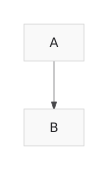
There are a few more commands in the README, but you get the general idea. I find building CLI tools like this to be a really productive way to get familiar with a specification, even if an agent writes most of the actual code.
datasette-mcp
The second project is datasette-mcp, a Datasette plugin which adds a
/-/mcpendpoint to any Datasette instance.This is probably the fourth time I've tried building this plugin, but thanks to the new stateless MCP specification I finally have a version that feels good to release.
It provides just three tools:
list_databases(),get_database_schema(database_name), andexecute_sql(database_name, sql). They do exactly what you would expect them to do - thoughexecute_sql()is read-only for the moment.Wire these into an agent, or a chat tool like ChatGPT or Claude, and they'll gain the ability to run SQL queries against your hosted Datasette instance.
So far I'm running it on the Datasette mirror of my blog, at datasette.simonwillison.net/-/mcp. It took a bit of fiddling to figure out how to attach that to ChatGPT and Claude, but I got there in the end. Here's a new TIL showing exactly how to do that.
Here's a shared Claude session where I asked it:
list tables in simonwillison.netAnd then:
what has Simon said recently about MCP?It ran 7 separate SQL queries to figure out the answer.
llm-mcp-client
My LLM tool is long overdue for an official MCP integration. The new alpha llm-mcp-client plugin is my attempt at exactly that:
llm install llm-mcp-client
llm -T 'MCP("https://datasette.simonwillison.net/-/mcp")' 'count the notes'
Here's the output (including reasoning trace, I'm using LLM 0.32rc2):
Considering note count
I see the question "count the notes" is probably asking me to tally up blog notes. It could also mean published notes or drafts, so there's some ambiguity there. I'll need to figure out the total number of notes, likely by querying the count for both published notes and drafts to get a clear answer. Let's execute that count!
There are 151 notes.
And the output of llm logs for that prompt.
Once this is fully baked, I'm considering bringing it directly into LLM core. I'm excited to experiment with MCP in Datasette Agent and llm-coding-agent as well.
MCP is a safer way to build with agents
A few months after MCP was first released, I wrote Model Context Protocol has prompt injection security problems, where I noted that the pattern of having end users mix and match tools pushed responsibility for avoiding data exfiltration attacks out to the users themselves. I hadn't coined the Lethal Trifecta yet, but that was absolutely what I had in mind.
Then general agents with arbitrary shell and
curlaccess came along, and that's so much harder to keep secure!Something I've come to appreciate about MCP is that it's much easier to reason about agent capabilities and what might go wrong than with arbitrary command execution in an open network environment - the default for most of today's general and coding agent tools.
I plan to lean into MCP a whole lot more when I'm building sensitive applications on top of LLMs.
You are only seeing the long-form articles from my blog. Subscribe to /atom/everything/ to get all of my posts, or take a look at my other subscription options.
-
Daily Deal: The Lifetime Learner Bundle
The Lifetime Learner Bundle feature access to uTalk and Stack Skills. Through uTalk, you’ll be able to speak keywords and phrases in no time and will start to see the results straight away. You can pick 6 languages to learn from their library of 140+ languages. You also get access to Stack Skills, the premier […]Reply source -
Federal Judges Chastise Trump’s Justice Department For “Unlawful,” “Unethical” And “Unseemly” Conduct
This story was originally published by ProPublica. Republished under a CC BY-NC-ND 3.0 license. Across the country, federal judges are calling out Department of Justice lawyers, questioning in unprecedented ways whether they can be trusted to tell the truth or uphold centuries-old legal norms. From Washington, D.C., to Rhode Island to Oregon, federal judges nominated by presidents from both parties, […]Reply source -
Ctrl-Alt-Speech: Zuck Starts Throwing His Weights Around
Ctrl-Alt-Speech is a weekly podcast about the latest news in online speech, from Mike Masnick and Everything in Moderation‘s Ben Whitelaw. Subscribe now on Apple Podcasts, Overcast, Spotify, Pocket Casts, YouTube, or your podcast app of choice — or go straight to the RSS feed. To get extended episodes with additional coverage, support us on […]Reply source -
What Ukraine’s Battlefield Openness Can Teach Washington About AI Access
On a laptop screen in a dimly lit tent near the Donetsk front, a Ukrainian drone team steers its aircraft into the turret of a Russian T-72 and glimpses the start of an explosion before the picture dissolves into static. The strike is uploaded, verified, and scored against the point value assigned to the tank. […]Reply source -
I wrote a long-ish reply on Reddit about coding with AI. Not all AI is slop. Vibe coders should be honest with themselves and others.