soFab publisher
- demo.rss.chat
I'm looking into how to document privacy for an RSS-based, federated service, and I'd love to see how others have handled it.
Specifically: what happens to a post once it leaves your server — syndicated over RSS, cached, crossposted to another instance, or shown by third-party readers? I'm based in Europe, so I'm especially keen on examples that aren't written purely from a US angle. Not looking for legal advice — mostly how people have actually thought about it.
A couple of decisions I ended up making, as discussion starters (and because I'd genuinely like to hear if others went a different way):
Erasure vs. federation. Once a post has been crossposted to another server, my take is that actual removal over there is up to that server (caches, archives) — we request the takedown, but can't guarantee it. How do you word this without either over-promising or scaring people off?
Traces after deletion. When an account is deleted, its old public address returns a permanent "account withdrawn" (HTTP 410) — which still reveals that a handle once existed. I chose to spell that out rather than pretend deletion is total. Does anyone handle this differently?
For context, here's where we're at right now (available in several languages; English here):
https://sofab.ch/public/legal/privacy-en.htmlGenuinely interested in the RSS/federation side specifically.
- demo.rss.chat
Song of the day: "Highlands" from Bob's Time Out of Mind.
— via @chris, https://chatouk.sofab.ch/p/Yipcb6ASd47t
- 1 reply demo.rss.chat
Gentle bump on this one — still wondering if there's a supported path (or an experimental endpoint) for changing a user's email while keeping screenname and feed. Happy to test on rsschat.sofab.ch.
- demo.rss.chat
I built a small experiment on top of the rss.chat API: https://chatouk.sofab.ch — an independent public-posts app that bridges with the rss.chat network.
It works both ways. A reply written in Chatouk is crossposted through the API and threads correctly here. And replies posted here flow back in real time into Chatouk threads via the WebSocket firehose, shown with their origin.
Nothing but open standards: RSS out, the rss.chat API for crossposting, the firehose for listening. The bridge setup is multi-server — this instance and https://rsschat.sofab.ch are connected so far, adding another takes one command.
- 2 replies demo.rss.chat
Question for the rss.chat team, from the operator of the instance at rsschat.sofab.ch: is there a supported way for a user to change their email address after signup? One user is switching to a new email address and wants to keep their screenname and feed.
- 1 reply demo.rss.chat
Surprisingly, posting from my smartphone interrupted the song I was listening to on Qobuz (the new Rough and Twisted at the time). Oh well—I like silence too.
- 1 reply demo.rss.chat
On the soFab side (we self-host an rss.chat instance at rsschat.sofab.ch), here's how we're handling it in the meantime — from our privacy policy, now live:
Image and video metadata. Images and videos uploaded to mytis.sofab.ch are re-encoded or remuxed on receipt: embedded metadata (EXIF — GPS location, device details, timestamps) is removed and never stored. Files contained in ZIP archives are transferred as-is and are not modified. Exception: rsschat.sofab.ch runs third-party software (rss.chat), where posts are public by design; it does not yet strip metadata, so files posted there keep their embedded metadata.
We deliberately don't patch the rss.chat code we host, so disclosure is our interim answer — if stripping lands upstream, we'll happily delete that exception sentence.
- 2 replies demo.rss.chat
I asked Claude, as you suggested. Here's the summary.
Your theory is close: it does depend on what the client puts on the clipboard, but there's no system pref involved. When you copy an image in Preview, macOS puts re-encoded pixel data on the pasteboard, so the EXIF from the original file never travels — the paste arrives "clean" by accident. When you copy the file in Finder, the browser receives the raw file bytes, GPS and all, and rss.chat stores them as-is. Same story on other OSes, each with its own inconsistencies — so relying on the client means the outcome depends on which copy gesture the user happened to make.
The only fix that protects everyone equally is stripping server-side at upload time, before the file is stored. One implementation note: apply the EXIF orientation to the pixels before purging metadata (e.g. sharp's
.rotate()with no args), otherwise iPhone photos come out sideways.Since rss.chat is a publishing tool, some users legitimately want to keep EXIF (camera settings, copyright/IPTC). So a user pref could make sense: a single checkbox like "Strip photo metadata at upload" — checked by default. Users who uncheck it know what they're doing; users who never open the prefs are protected. Defaulting the other way wouldn't help the non-technical users this is about, since they'll never find the setting.
- 4 replies demo.rss.chat
About image metadata:
If I open an image in Mac Preview, for example, then copy the image and paste it into a post on demo.rss.chat, the posted image does not contain metadata such as GPS altitude, GPS date/time, GPS latitude, or GPS longitude.
However, if I copy the image file itself (for example, from Finder) and paste it into a post on demo.rss.chat, the posted image does contain all of that metadata, including GPS altitude, GPS date/time, GPS latitude, and GPS longitude.
Is this the intended behavior, or should the metadata be stripped before the image is saved by rss.chat?
Maybe non-technical users should be made aware of this?
- demo.rss.chat
Reply test from demo.rss.chat
- 3 replies demo.rss.chat
Reply Test from chatouk
— via @chris, https://chatouk.sofab.ch/p/4rZ4ewlOI4xq
- 1 reply demo.rss.chat
The SAVED indicator in the composer seems to "lie to me":
type something, see SAVED,
then cancel the overlay — or accidentally click outside it — and click New post again: the text is gone.
Bug, or am I missing something? - 1 reply demo.rss.chat
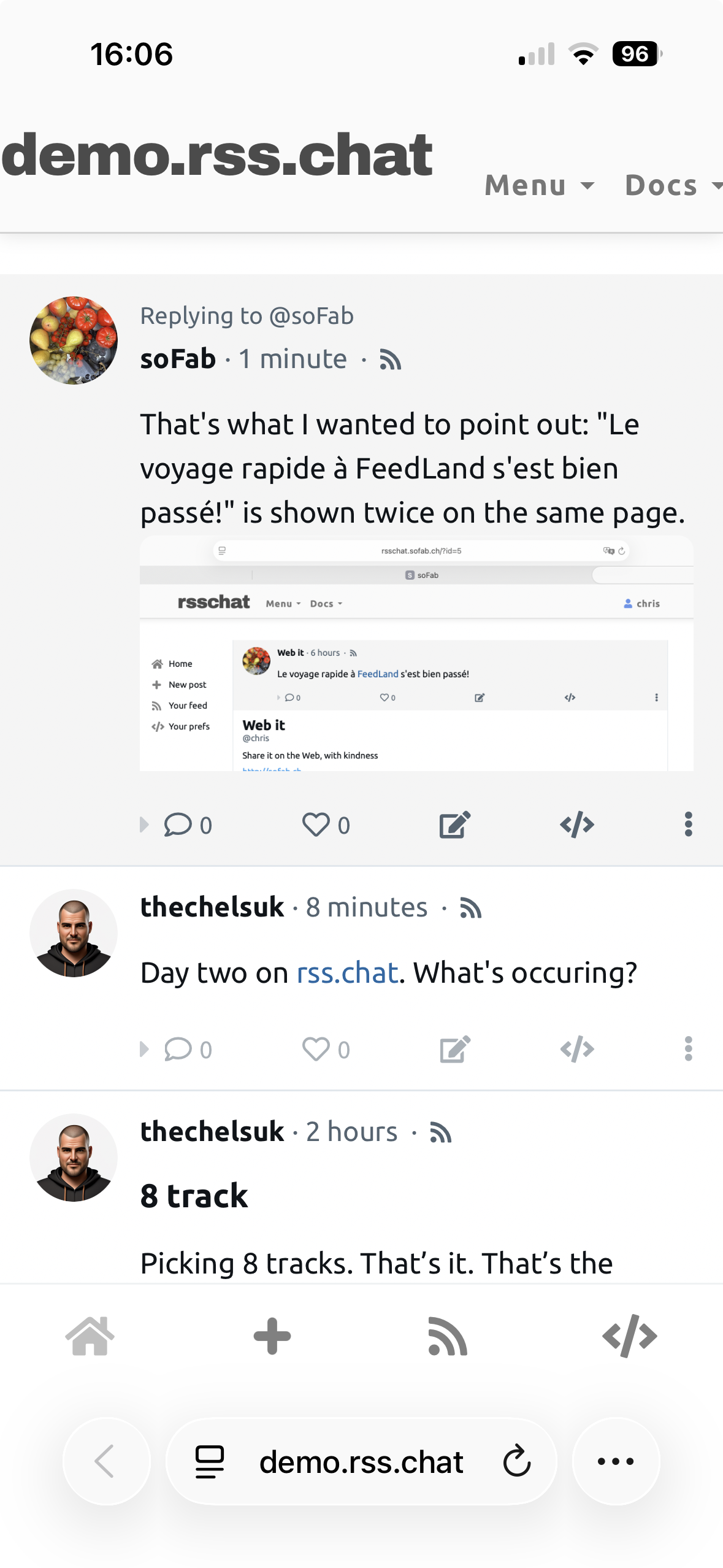
On smartphones, the top bar could be more responsive:
- demo.rss.chat
That's what I wanted to point out: "Le voyage rapide à FeedLand s'est bien passé!" is shown twice on the same page.
Uploading image…
- 1 reply demo.rss.chat
Are technical questions, bug reports, and feature suggestions welcome here, or is there another place for them?
- 1 reply demo.rss.chat
Minor unexpected behavior
In a browser (e.g., Safari or Firefox on a Mac)
Click the post feed icon.
Click browser's Back button.
Click the post timestamp.
Click the post username.
Click browser's Back button again.
You should see the last post and the user's feed on the same page. - 1 reply demo.rss.chat
Much better than Chatouk!🙄
- 4 replies demo.rss.chat
Test reply from demo.rss.chat to Chatouk
- 5 replies demo.rss.chat
Test reply to https://demo.rss.chat/?id=175 from chatouk.sofab.ch.
— via @chris, https://chatouk.sofab.ch/p/WIuDSq_B-uo4
-
Feature idea
6 replies demo.rss.chatFeature idea:
a one-click "copy permalink" command on each post — copies the post URL (e.g.https://demo.rss.chat/?id=73) to the clipboard.
The timestamp already links to the permalink, but copying it still means navigating there and grabbing the address bar.
A copy affordance would makeinReplyTofrom other apps much smoother.