Timeline
Every post and feed across this instance
-
Streamlining Social Media: Episode 12
Captions and an interactive transcript are in the player controls (Transcript button).
Show Notes
-
Streamlining Social Media: Episode 11
Captions and an interactive transcript are in the player controls (Transcript button).
Show Notes
- Internet Explorer declines as Google Chrome usage increases: CNN
- The Facebook Obsession documentary on CNBC
- Groupon Proposal
- Neer iPhone app
-
Use Slideshare to repurpose your presentations

Slideshare has been around for a few years. It’s a great tool for sharing your Powerpoint and Keynote presentations from speaking events. It is also useful as it’s own multimedia destination. By posting a presentation, you’ll find some great backlinks for SEO benefit. Post links within your presentation and description back to your website. In addition, embed the presentation into your blog as you see below. See Slideshare’s 2010 Zeitgeist below. Connect with me on Slideshare:
-
Streamlining Social Media | Episode 10
Captions and an interactive transcript are in the player controls (Transcript button).
Show Notes:
-
My 3 Words for 2011

Chris Brogan recently posted an article entitled “My 3 words for 2011.”Every year Chris comes up with three words that will summarize this focus for the year ahead. I decided to do likewise.
Create. Consistent. Results.
Create – I will create content, materials, art, music, and value in many areas of life. I can’t go on merely consuming the news, absorbing trainings, we’re just reading. My sponges full, and I need to share what I create. Consistent – I get all excited about new projects, ideas, methods, goals, and whatever new flashy thing comes my way. What I need is truly consistent in areas that will challenge me. For me this looks like a monthly newsletter, a daily blog post, a weekly podcast, time with my mentor, exercise, and meditation. I will choose tools that support being consistent. I will schedule time of my Google calendar. I will make appointments with myself. Results – results matter. I’m a very driven person and want to reach whatever the goal is. I need to measure, plan, map, and implement what will reach those results. This applies in my personal life as well as in my business life.
What is the goal?
My goals in 2011 include a staff of virtual assistants, public speaking, social media training and consulting, pay off all debt, balancing personal life, taking time for hobbies, growing spiritually, and getting married. To reach these goals I must include each of my three words, but I also want to create consistent results. What are your three words? Leave a comment below.
-
Facebook Personal Profile Changes
Facebook has rolled out an opt-in Facebook personal profile layout. The navigation now matches the rest of Facebook’s layout. You can opt-in to it here your Facebook profile After reading Jesse Stay’s review of Facebook Lists, I dove in to change update my profile. I wanted to show off a list, similar to my peers and leaders in the tech and social media scene as my Twitter Techies list. So – I created a new list, added a few people to it, and then noticed something odd. Not that my list showed perfectly on my profile, it did, but that Mari Smith was getting a lot of traffic to a recent photo she’d uploaded about this topic – featuring me!

Mari got notified of my list
That wasn’t my plan, but in doing so, I learned a few valuable things about the profile changes.
- New Featured Lists notify people you add to the list.
- The privacy settings won’t let you block people from adding you to a list yet
- You need to see the privacy settings to control who can see your new lists.
- For more questions about the new profile, visit:Facebook profile help
Get a quick video tutorial here:
Captions and an interactive transcript are in the player controls (Transcript button).
See additional security information at:


-
Streamlining Social Media: Episode 3
Facebook Email, Facebook Livestream, Tynt attributes text copied from your site, Glogster helps you create multimedia rich posters to place on your website, and more in Episode 3
Captions and an interactive transcript are in the player controls (Transcript button).
-
Facebook Groups Overhauled to function as Lists
Facebook overhauled Groups to function in place of Lists. Only 5% of users were using the Lists feature to organize their connections. To remedy this solution, Facebook has reworked the Groups feature. By logging in to Groups, you can add anyone you want to the group you create. A quick rundown of the new features:
- Group Chat
- Group Notices
- Shared docs
- Limited icons reflecting your group
Captions and an interactive transcript are in the player controls (Transcript button).
This has strong potential to quickly become spammy, but also can be great when handled appropriately. I like the idea of using this with social friends primarily, and to create networking opportunities. Avoid adding others to groups just as a way to socialize with them. The next area of mind-numbing but needed organization is to remove ourselves from groups that we’ve been added to unnecessarily. Within moments of the new groups, I noticed several of my connections being added to public lists in a rather spammy fashion. See: The Ugly Side Of The New Facebook Groups
- Opt-out
- Can’t hide group chat
- Confusion vs pages and lists
Here’s step-by-step how to create a group: “How To: Create your new group on Facebook” I quickly did a demo of how to create a group. I can see this becoming useful for my weekly get-togethers with friends:
Captions and an interactive transcript are in the player controls (Transcript button).
Other Social Media news:
-
Facebook went down : Your website is your home-base, not social media channels
The inevitable has happened, last week Facebook went down. For most users, this was a minor inconvenience. For social media managers, like me, this was a near tragedy. I was on a deadline to invite many people to the launch of GFYD’s Facebook Fan Page and teaching webinar attendees how to create your own custom Facebook Fan Page tab with The Fan Page Factory. Not only could I not perform my work, but I also couldn’t find out what my friends were planning for the weekend. In the interim, I wandered off around unknown parts of the web to read blogs and other industry news. I wanted to leave a comment on a blog, and found the post comment feature broken because the site was using Facebook Connect to allow me to post a comment. The “like” and “share” buttons across the web all stopped for a few hours. In the end, Facebook had to reboot their system. During this interruption, or other interruptions like Twitter going down, we are reminded how valuable our network connections and home-base really are. For a rare switch, many of us ranted in Twitter about Facebook being down, rather than the other way around. But – we were still able to connect. As many connections as I can have on multiple platforms, the better. I can still find and connect with them in many places and continue our networking. More importantly, the importance of having your own place for your own original content is important. Just like our servers or computers, even the big companies suffer failures. But, having your own content on your own website ensures you have a space that is yours to control. Free blog places like Wordpress.com are acceptable to just get started. But to really have full control on backups, content, and a customized look, you need to have your own website on your own server. I recommend Wordpress self-hosted. I love my host: Hostgator. If you need help getting your site created or want to learn how to do this yourself, check out what my team is doing at GFYDMember.com. We are helping you build your own website and network in social media.
Related articles by Zemanta
-
Send your @Diigo Bookmarks to Twitter
When saving your Diigo bookmarks, sometimes you may want to share this information to Twitter. This creates both valuable traffic to your Diigo profile as well as helpful information for your Twitter followers.
Captions and an interactive transcript are in the player controls (Transcript button).
-
Backing up your Bookmarks or Favorites online
Saving your bookmarks or favorites to your computer is a quick way to access your favorite websites. If you reformat your computer or some other disaster strikes, you may loose all those important sites. Even if you access multiple computers or other devices, you won’t have the same bookmarks on each computer. A great way to ensure you have your content backed up is to use social bookmarking. By backing up your bookmarks or favorites to a social bookmarking site, like Delicious or Diigo, you will be able to access your saved information no matter what computer you are using. Synchronizing your bookmarks makes navigating the web much easier. Learn about Social Bookmarks in Plain English: by CommonCraft
-
How to use Google Voice
Keeping track of my business phone, my home phone, and my mobile phone can be nearly too much to handle. Thankfully, I got an early invite to Google Voice. And even better, yesterday Google Voice announced it was open to the public. The beauty of Google Voice is that you have just one phone number that you can use as your hub. Depending who is calling you, you can give them a specific voicemail greeting, forward the calls to specific phones, and receive a transcription of the entire message in your email. Check out the video from the Google Voice team:
Captions and an interactive transcript are in the player controls (Transcript button).
And see my video for how to use your Google Voice account:
Captions and an interactive transcript are in the player controls (Transcript button).
Learn more about Google Voice
-
Social Media Shortcut: Share your photos across multiple networks with 1 upload
Sharing photos online is a great way to engage others in conversation. But – should you share to Facebook, Twitter, Flickr, Picasa, or somewhere else? The answer is: YES! I’m all in favor of sharing the same photos across multiple platforms at once. By doing so, you share the image with different connections, no matter where they are connecting with you. To make it easier, you can use Pixelpipe to send your photos to several places at once, even to your Facebook Fan Page.
A quick word of caution: upload just a few pictures at a time. Save those entire photo albums from your hiking trip for just one destination. Twitter users will only want to see one or two pictures at a time. Check out Pixelpipe:
Captions and an interactive transcript are in the player controls (Transcript button). -
Trackur: Brand Management & Social Media Monitoring
As businesses continue to implement a online marketing strategy, they quickly look for their social media return on investment. Getting those numbers can be difficult if you don’t know what others are saying about you. It is important to listen to implement brand management, or monitor what is said about you, your company, and any products or services that you offer. If you’ve gotten one of those amazing SEO keywords lists, or a list of key phrases your ideal clients are using online, it makes sense to include those words on your own website, and in places that you or your company posts any type of content (status messages, photo tags, video descriptions, or just about anywhere else). But, finding where people are already using those same phrases can help you know where the your ideal clients are already showing up online. That’s where to go comment on blogs, engage in a conversation, share their videos or photos to your community, or just begin to observe what they are saying. So – how are you monitoring this information? Google Alerts is a good start, as is SocialMention. Google Alerts doesn’t show the sentiment, or whether the information was favorable or not. Social mention is a great start as well, but doesn’t let you save the information. Many other more robust services have popped up. Trackur has just announced a limited account option that is now FREE. Check out how you can better monitor the real-time web with their service.
Captions and an interactive transcript are in the player controls (Transcript button). -
MeetWith.Me: How to show your availability for meetings
Ever need to show others, especially clients, when you are available for a meeting? I keep all my appointments in my Google Calendar, and even share my meetings with assistants. When I need to schedule a meeting with others, I often send them an invite to the event in my Google Calendar for them to confirm as well. However, I have wanted a way to schedule client appointments with their help. MeetWith.Me has created a way to do just that. I can now add a widget to my website that shares my calendar for clients and others to see. Others cannot see who I am meeting with, but just my availability.
Captions and an interactive transcript are in the player controls (Transcript button).What I would like to see in future releases of this service: a widget that I can properly resize for my website columns, and a way to embed the full calendar within my own site. I do love the idea that clients can review my schedule and compare it with their own BEFORE scheduling an appointment with me. Check out my calendar
-
Which Content Management System is right for you?
Wordpress vs. Drupal vs. Joomla
Feature
Wordpress
Drupal
Joomla
Pros
-
Easy to use
-
Great for blogging
-
Many developers and skilled service providers
-
Routine updates
-
Many existing themes (designs)
-
Many free custom plugins (features)
-
Developer friendly
-
Fair amount of plugins (features)
-
Highly customizable options
-
Strong community support
-
Well-established community of developers and users
-
Highly customizable architecture
Cons
-
Still requires some minor programming knowledge to customize
-
Best templates are built off “framework templates” and require design knowledge
-
Plugins can conflict with updates to platform
-
Plugin developers may abandon their free tools
-
Not designer friendly
-
Requires programming knowledge
-
More clicks or steps to publish updates
-
Not as user-friendly for updates
-
Less free themes or plugins
Tips:
- Get a webhost that is Linux/Apache hosting with PHP5. These platforms run best on Linux/Apache, not Windows.
- Many hosts, such as Hostgator, offer cPanel with Fantastico. This makes installing these platforms much easier.
- Do not use Wordpress.com. Put your own site, even if Wordpress operated, on your own servers. This helps drive traffic at your own domain name, and is much more customizable. Your options on Wordpress.com are limited, and they can remove content based upon their Terms of Service.
Possible Alternative:
While not personally a huge fan of Squarespace, it does have a growing community of users. The main benefit offered is that Squarespace hosts your site, maintains updates, and allows site owners to easily customize the look of your own site. The downside is still less plugin (features) support without knowing programming knowledge. Again, as they maintain the content, please review their Terms of Service.
-
-
What do i need to get a website created – pt 2.
We discussed in Part 1 the need to be clear about the content of your site. The next need to identify is what to build your site on.
Website setup changes
Content management systems make creating, updating, and maintaining websites more user-friendly. Originally creating a website was a hard task. It required creating graphic design, cutting it apart like a jig-saw puzzle, then using software like Frontpage or Dreamweaver to make the html code, and then uploading all that to a web server. (Or, even further back: learning plain html code in a basic text editor – think: creating a website from Notepad). Then, if you wanted your site updated, often it required paying the web-designer an additional fee. Content management systems have changed this process. Now, if you can use a web-based email account, like Gmail, and a web-based calendar, you can update your own website.
What are Content Management Systems?
Most Content Management Systems are open source. This means, they are free, and have a large community of programmers and developers that freely update and create improvements to the system. The advantage to using an open-source content management system compared to a private label service is in the numbers of people that you can contact for support, should you decide to leave your current provider.
Why should I use a Content Management System (CMS)?
While it may still require hiring a web developer to install and set your site up, as well as a designer to create a custom look to your site, and maybe even a copywriter to help on the “static” pages, using a website content management system will make updating your site yourself, or having a specific person/department in your company do this work much more efficient.
List of Open Source Content Management Systems (cms):
- Wordpress (originally created for blogging, but now functions to host an entire site)
- Drupal (ideal for large scale websites with high functionality)
- Joomla
In the next post, we’ll review the advantages and disadvantages of each content management system, and ensuring your webhost can support your choice.
-
How to register your website address
Is your name available?
The first step in purchasing your website domain name is determining if the name is available. Obviously visiting the address you want will show if there is a page there or not. If you find a “Parked Page” that indicates someone owns the name, a visit to WHOIS will tell you who has purchased it. You may be able to purchase the domain name through a bargaining process. Otherwise, pick a new name and search again. After you determine the name, visit a name reseller, such as GoDaddy, to purchase your name. For further help, follow this quick tutorial:
View more presentations from Courtney Enle.
-
What do I need to get a website created? Pt. 1
What is your site about?
The first step in creating a website is clearly defining your purpose. What will your website reflect?
- An information page about your business
- Your personal blog
- An online store
- A social network
- A training center
- Many more ideas
Planning your site begins with creating your message. Before you purchase your website address, there are a few tips.
If your site is about your business, purchasing a web address (also known as a domain name) that reflects the company name is obvious. Many people are creating a personal brand online, or simply want to own the rights to their own name as a web address. In upcoming posts, we’ll review what content is best reflected into a personally branded website. Creating an online store, or any website where the main business activity is an actual website, not a physical location to visit, requires a great deal of planning. It would be best to get a website address (or domain name) that reflects specific content, and get some search engine optimization research before buying that name.
Does size matter?
The length of your web address matters somewhat. Consider what someone must type to reach your site, and where your link will be placed later. If you want to make it easy for others type in your address, or post it often in Twitter – keep it short. If you have a longer company/personal name as a web address, it would make sense to keep the same name as a web address if it’s available. If your site is about an entirely online business, such as a store, the more important factor may simply be getting found. Picking names that turn up well in search engines will become your goal.
-
How to Collaborate Online on a Project
Collaborating with the entire business team on a social media marketing plan is key. Doing so only through the phone and internet is possible but needs extra focus. While the project manager, graphic designers, web hosts, marketing department, public relations manager, and concept creators are located in one part of the country, the phone applications developer and social media strategist are located in opposite directions. With a few tools – sharing ideas can move the team forward.
Mindmapping – brainstorming is vital. Collecting the ideas shared for further development is needed.
Web versions (some are free up to an amount of maps)
Software (requires emailing file attachments, typically)
Phone applications
Examples for inspiration
Stay tuned for more online collaboration…
-
What businesses help you keep yours operating?
To keep your business operating, what additional businesses do you need to connect with?
- printers
- web hosts
- graphic designers
- electric
- plumbing
Businesses need each other to build their own business. Mutually beneficial relationships help both businesses expand their success. This is the basic premise behind attending Chamber of Commerce mixers, or other networking events.
True networking online
With sites like LinkedIn, Twitter, and Facebook we can now meet and connect online. Just showing up in these places is not enough. Do you have a plan and a purpose for your time there? LinkedIn is primarily business to business, or also seen as a business formal platform. While here, the Q&A area is a great way to give value to others. Find questions to answer. Be more interested benefiting them than announcing yourself. You will stand out. Facebook started as strictly social fun, and many still prefer to keep it that way. Others see it as business networking exclusively and don’t build much personal interaction. As Facebook is seen as business casual, we want a happy balance of both. This a great way to connect with others, beginn chatting, and move to a phone call. Twitter is the constand cocktail party. You can make up all your own rules as to how and why you show up here. (See previous post: Calvinball). Sites like Twellow and Wefollow are directories to find connections in specific places. It is like the yellow pages for Twitter listings.
But I want to do business with someone I know or is referred to me
When you are searching for a new hair stylist or barber, you likely ask others “who do you go to”. The same principles can apply online. In his program, “Endless Referrals“, Bob Burg shares principles on building your business using referrals. By being more interested in them, you make them stand out. To follow up, The Go-Giver, provides great insight into being more focused on giving value to others. If your true intention is to promote others and make them look good, you are a great value connecting them to things that help further their business. How does this work online? The same principles still apply. A few months ago I attended BarCampHarrisburg. I learned about it through Twitter. While there, I met a few great people in different aspects of web development than I offer. I followed them on Twitter promptly. We’ve since met at Tweetups, a networking event of other Twitter users. Now I find myself working with a client that may be in need of services that others I’ve met online and later in person can provide. I want to refer business this way. I asked them about their services, and have established a degree of relationship with these individuals. I’ve asked them how I can refer business to them, and I’ve watched how they are representing themselves and clients online. Also, I have asked others – what are you looking for? Projects, jobs, new clients, and referrals are things many people need. By knowing what others seek, I am more aware of how to refer others to them or refer them to potential clients or employers.
-
Twittiquette: Twitter ettiquette is your opinion and decision
Twitter is constantly changing, evolving, and growing based upon how the community uses it. There are plenty of opinions to be found on how it should be used as well.
Auto-follow and Direct messaging Etiquette:
Mari Smith shares why she chooses to auto-follow, but not to direct message. The initial hand picked group that you wish to follow can be a way to find great people while avoiding spam bots. Once you’ve reached a certain volume of people following you, you may find it overwhelming to keep up with following them back.
Direct messaging can be handled in a few ways. Many take the stance that no automatic welcome direct message is appropriate as too many people have abused this policy by sending links to get their free ebook or other self-promotional items. Some feel a welcome message that asks others a question is great. And some, just block all the DMs using services like Jesse Stay’s SocialToo or Tweetlater. Both services are great for filtering services, and Tweetlater still allows you to send an automatic welcome direct message. Use caution on your approach and what it says about you.
My opinion – autofollow and a welcome message that invites others to strike up conversation and connect further. As Bob Burg has taught me, be more interested in them by asking them questions about themselves. I currently am asking questions in my automated follow, and giving a link to my online profile of all my social network accounts at http://ClickToAdd.Me/CourtneyEngle.
Should you follow everyone that follows you?
Robert Scoble feels that it is worthwhile. However, there is no realistic expectation to read every single tweet. He values following everyone that follows him, but filtering through the noise using Tweetdeck.& Friendfeed’s search features.
To maximize your time in Tweetdeck, see this guide from Richard Barley: All your TweetDeck Questions Answered
Randy Gage, on the other hand, is much more selective about who and why he follows some individuals. He wants to have a more personal connection and not be overwhelmed in content that isn’t beneficial.
My choice: follow most everyone that follows me. I use Tweetlater to accomplish this. I unfollow those that unfollow me automatically as well. My reason – I sort through those that I specifically want to read into columns in Tweetdeck. I connect with others when I see general chat, quotes to forward, or links to share and respond to. This is how I choose to connect in Twitter, and it works for me. I want to connect with others, but know that I don’t need to always chat constantly with you. When either of us have something to share or connect about, we will interact. This method has led me into two recent large business ventures, a few great recomendations for activities, and reconnecting with long lost friends. Eventually we move a meaningful connection beyond Twitter to the phone or other networks and instant messaging clients.
What will you Tweet about?
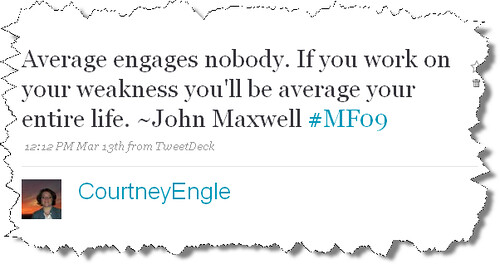
Twitter is like being at a business mixer, cocktail party, and school dance all at the same time. You can connect with friends and chat. We want to see some of that. You can create business connections and ask how to refer business to each other. You can share quotes, repeat or retweet each others messages, and you can share links. But, please don’t be the wallflower at the 8th grade dance that just watches everyone else having fun. Join in. You have value to offer to the network you are building. Share what matters to you, professional and off-the-clock work.
-
Blogging with purpose
I’ve been blogging since 2002, but have been rather inattentive to my blogs. I even laid out the best plans for several sites. I run a few blogs, with the intent to keep the focus of each rather clear:
- Beginning Momentum – focusing on network marketing & home based business
- Completely Alive – focusing on wellness education and information on my health coaching program
- Web20iGoBlog – a blog on emerging and informative social media uses online, prelaunching an online class
- A personal blog that shares my faith and what I’ve been learning lately
- This blog – a slight catch-all for my varied interests
With all these sites going on (and, no you don’t need multiple sites unless you want them) – I was great at setting them up – but lacking in posting. This must change. Also, I want to optimize my views by syncing all my blogs to shared output places like FriendFeed and Facebook Notes. This way more people can read my content. I’d love input from you. With my varied interests in business, technology, wellness, personal development, leadership, faith- is my blog best served to include a catch-all of all these topics? As a great tip – here’s a video I did on importing your blog posts automatically into Facebook. [youtube]http://www.youtube.com/watch?v=EkNNLlkOAxg\[/youtube\]
-
Connecting with LinkedIn
Nearly a year and a half ago I was invited by Dave Saunders to sign up for LinkedIn. As any compulsive social media joiner, I created my account, and then abandoned it. I hardly paid notice of it, until just the past few months that is. What led to the switch? Well, the obvious part about teaching it to others in an upcoming online training program means that I first must understand, apply, and implement LinkedIn. More importantly than just teaching it, I now have see how to help other businesses get noticed by participating in LinkedIn. I’ve been working with a chiropractor. Out of curiosity, I did a quick search on the word “chiropractor” to see what information LinkedIn offered. To my surprise, several people had posted questions asking for recommended chiropractors in a specific reason. Lesson learned: create an account, complete your profile, and participate in Questions & Answers with LinkedIn. Connect with me on LinkedIn: http://www.linkedin.com/in/courane01
-
How to further face to face networking online
While at Starbucks on Sunday, I was making use of their free wifi as I slowly sipped on my Venti Sumatra black coffee. I’ve been overhauling JJ Rail Sales, moving them from a Frontpage based site to a Joomla based site. Translation: using a content management system that is built to support the back-office website needs for clients. In between listening to some fun podcasts, I overheard a discussion on the PA Farm Show – and shared my obsession for a rare indulgence: maple ice cream. It’s the real deal – 100% maple syrup in ice cream. After some discussion, and more work, I was packing up to leave when Kyle asked “what do you do”. In networker fashion, I used some great tips from Bob Burg. “I help people” who have a need to grow their business or develop new clients implement a social media marketing strategy. I teach them not to be spammy, but managed to help Paul Buskager double traffic to http://hoofchutes.com, landing 7 out of 10 new clients all based upon web traffic. I teach and coach them to show up online in a way that engages others and creates a natural interest. The key is – be authentic, be mostly transparent, and interact with others. What do you do? Kyle was interested rather quickly. He’s a student at a nearby university, a dj, and a reporter. He asked to connect further for a potential news piece. That does sound like a blast. I then remembered – I’m in the social media networking world. How can we connect further beyond swapping business cards after a good face-to-face networking event? Well, let’s connect on all our social media sites of course! Here’s the moment in action:
[youtube]http://www.youtube.com/watch?v=ANouINHDSIk\[/youtube\]
A fast way to find all the other places you can connect online is Retaggr. It also includes great apps like email/forum footers, and a mega-list of places you can compare accounts and connect: http://ClickToAdd.Me/CourtneyEngle.
Are we connected yet?
-
How to Increase Business using the Social Media Marketing Funnel
I’m excited to announce that the doors are open to register for the live social media marketing training event with Dave Saunders. It starts this coming Tuesday, January 13, so if you want to harness the raw power of social media to attract leads and grow your business online, sign up today. http://is.gd/eYbR If you’d like to help others discover this event and achieve success with their business, please share this address through Twitter, post it on your Facebook wall, submit the address to Digg.com or add it to your other favorite social media sites. By the way, if you don’t know what any of that means, register for this class today. http://is.gd/eYbR With 8 sessions and follow along guides for each, you’re going to get your money’s worth with this training. And just in case there’s a question not covered, you’ll have special email access to Dave Saunders during the duration of the event. That means you’re totally covered when it comes to getting access to what you want to know about growing your business online with social media. I’ve partnered with Dave in training and planning the social media needs for a variety of fields. His heart to see others succeed stands out. The clients that have applied this approach to marketing have seen a rapid increase in their business. By doubling traffic to their business site and connecting to many more clients using social media, it is clear Social Media Marketing is a refreshing approach to increasing your personal brand. This class looks to be great fun.
-
BarCamp Harrisburg wrap-up
I’ve just returned from BarCampHarrisburg and my mind is spinning with ideas. BarCamp is part of unconference leaderless approach to networking. One person initiates the idea, and takes on coordinating the event. Others freely join in and contribute to what interests them. Our organizers included:
- Rich Hauck (email, twitter: mandalatv, Website)
- Dave Robertson (email, twitter: daverobertson, Website)
- Dan Thompson (email, twitter: withoutnoise, Website)
When the event kicks off, attendees post ideas on possible presentation topics. Again, the crowd organizes the topics by time slots and room locations. Similar gatherings are PodCamp (podcasting focused) and WordCamp (blogging focused).
Throughout they day, a few key highlights stood out:
1st session: mobile phone apps & marketing with them
This topic came just a day before JoelComm announced his own app for the iPhone. Could the next wave of connecting with clients, whether an internet marketer or any individual seeking to connect with clients involve customized phone applications?
2nd session: Using Social Media in the Harrisburg community
Central PA is not known for being a tech-driven area. We discussed various ways the local area is implementing social media, and debated the relevance of local print news.
- SpoToBe
- BeyondSecond – local art/photography
- BlogHarrisburg – local bloggers, tweetups, flickr group, etc.
3rd Session: Monetizing with Social Media
During this session I felt the topic was unclear. As I saw it, there were actually 4 potential topics emerging:
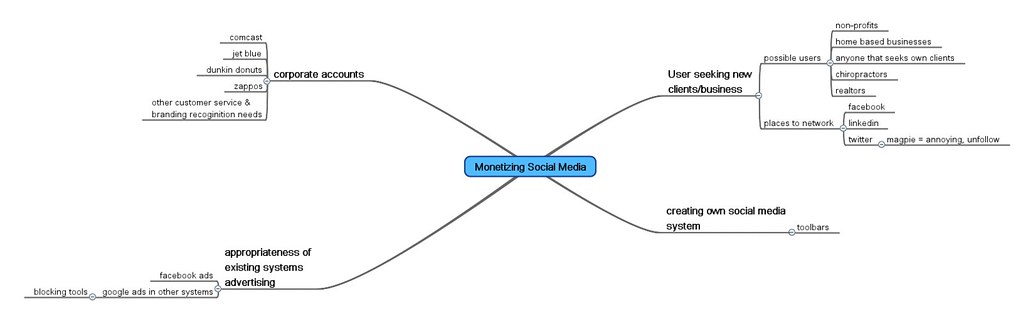
Session 4: How does a company website tie into the marketing plan
This session left me rather frustrated. I prefer discussions without interruption in which participants are able to engage and are heard. My conclusion, existing successful businesses may not need pretty websites, but new companies often will. Brand recognition and marketing plans will dictate the need for such sites, and word of mouth referals (or online reviews) stand out stronger than an ugly website.
Session 5: Drupal & Wordpress
This was a great session on Drupal theming tips. I anticipate a SlideShare of the Keynote presentation soon from Dave.
Final thoughts:
I enjoyed connecting with others I’ve met in Twitter leading up to the confrence. Future events sound exciting, but will take more crowd coordination to further the success of the events. If you get the chance to check out a BarCamp, WordCamp, PodCamp, or any other such gathering – go, engage, and lead. The networking is valuable, the topics enjoyable, and how you show up determines what you will get out of it. Thanks to Shawn Farner for Qik videos.
-
Who owns the ideas?
So you suddenly get a brilliant idea and are ready to share it with the world. After thinking on it for a while, synthesizing all the details of how other concepts are related and connected, you start putting the concept out. Suddenly, you find someone else sharing that same idea in some fashion. What reaction do you have? Many of us will jump to jealousy – “he stole my stuff and says it’s his”. If they at least give you credit – is that any better? What if your idea was original to you and your sphere of influence, but someone else truly did have the same idea? Whether divine revelation, or synthesizing the content already available in any type of media, knowledge is readily available. We live in an information age, and proper delivery of information is where the creativity matters.
Ideas in educational systems:
Last week a new process of fair use for copyrighted content was announced to enable public schools in America to implement content freely. Educational systems hold the role of presenting knowledge, and empowering students to analyze, synthesize and process that information in a meaningful way. To protect the rapid sharing without paying royalties, schools operate under fair use. They must credit the source of the idea, but no payment is expected. Check this video out for more details on it:
[youtube]http://www.youtube.com/watch?v=CJn\_jC4FNDo\[/youtube\]
Ideas in religious systems:
Even pastors get possessive at times of the ideas they are presenting. Though divinely inspired, is the message they share the result of other ideas? Who inspired the idea? If the goal is to reach as many people as possible with the knowledge and resulting impact that it has, does it matter who really shares this? Is it important that they give you credit? What if they got the idea, just as you did? What reaction do you have? Are you let down that you couldn’t be the one to present the idea first? What does that say about you? Are you thrilled that others have heard the wisdom you also received?
Ideas in business:
In business, a unique idea is what has previously made the sales possible. One company owns the rights to create something a certain way, or is the first that has learned how to do something. These exclusive rights is what has created the sale before. However, the same is not true always today. As information is constantly being made more available – what now stands out is customer service and approach in presenting ideas.
Give, Take, Borrow, Steal, or Freely Use?
When you present information – are you taking content from another and not giving credit? Are you giving your content to others to rework and redistribute? What influence do you have when you strive to maintain the idea as your sole property? At which point is the idea one that anyone could and should have?
Are you my neighbor?
In It was presented in Luke 10:27 how to interact with others. When someone takes your idea, or any other thing you feel they shouldn’t have done or been… what is your response? Do you have any obligation to empower others to freely give information?
27 And he replied, You must love the Lord your God with all your heart and with all your soul and with all your strength and with all your mind; and your neighbor as yourself. 29 And he, determined to acquit himself of reproach, said to Jesus, And who is my neighbor? … 36 Which of these three do you think proved himself a neighbor to him who fell among the robbers? 37 He answered, The one who showed pity and mercy to him. And Jesus said to him, Go and do likewise.
Thoughts on these ideas?
There is nothing new under the sun. We are reforming the ideas, but the ideas themselves are not all that new. How do businesses make money if they don’t hold on to their ideas? How do schools retain teachers if they are not unique (at least outside the public school system)? What is the goal for pastors in sharing ideas? What happens if they may not have stolen your idea, but had the same ideas themselves? What if they have learned from your ideas, how much credit do you need? What if they profit from your ideas? Share your thoughts!


photo credit: Menlo School
-
What everyone needs to know about social media
Having a background in teaching technology and business education, I am often asked a wide variety of tech support issues. As of lately, it is regarding social media as it relates to business. I’ve seen a few people rush to these sites and systems with little regard to how to interact appropriately there. The idea strikes them that they may be able to find lots of new business clients, and maybe even talk some of their former classmates into being their next client.
What’s not appropriate:
If you were walking down the street, and I bumped into you – though we’ve never met, would you want to buy my latest fat loss product because I spouted some web-address at you? Well, that depends. On occasion, this approach may work. Maybe you’ve been looking for just such an answer. However, you really are more interested in me, in what I have to offer, in the relationship – than you ever will be in what the product or service is. Save your link for when they ask, or make is accessible, but certainly don’t shout about it from a megaphone (unless the blatent approach is your preferred style).
What is appropriate:
Social media is about relationships. It is about connection. It is about information and value delivered. How you show up in Facebook or any other site is a reflection of you. I show up to connect with former students, roomates, classmates, friends I see regularly, new friends I meet online online, and business connections. One account, different uses. However, I am seamless throughout.
Great example of social media in action:
In the past two months, I’ve connected personally with some amazing people. As a result, we are developing businesses together all built through an online connection. Dave Saunders, who is a friend offline, has referred me on to assist several others:
- Paul Buskager
- Chris Vaz
- Brian Vaz
I’ve invested into this great crew to develop their social media skills, and am hearing great success already beginning. Though they may not have landed the huge contract at this moment, the door is opening for new relationships to start. As these relationships build, they will learn whether what they have to offer is of value to their connections, and learn from others in the process. I was blown away by what Paul shared:
[youtube]http://www.youtube.com/watch?v=rF4Uve9rY98\[/youtube\]
All of the current projects I’ve got my hands in are being built from my living room, with help from sites such as Huddle, Skype, Facebook, and Twitter. The actual projects at hand:
- Assisting in the development of http://yoursocialbrand.com
- Creating content for a soon to be announced online classroom to train others in How and Why to use social media. I’ve added in step-by-step instructions for beginners through advanced users for a variety of platforms, and Dave Saunders is leading the program in uses related to personal branding in genuine connections.
- Creating several personal websites and social media accounts for others, and training on how to make use of it all
- Business website creation
- Planning an extensive online classroom for a business equipping course in March
All of these projects are entirely collaborated online. At no point has it been absolutely necessary to meet in person to further these items.
Social Media is learning from each other continuously, interacting, and giving value to others. How are you showing up online? Photo by:

photo credit: Paul Keleher
-
Inspired By Others
Creativity is such an interesting thing. In interacting with others, I find the ideas and creativity keep flowing. In talking with like minded friends, I find I’m on overload sometimes with ideas, as is often the case with Dave Saunders. It is important for me to capture those thoughts. Lately my iPhone has been great for that. I can record audio clips, pictures, or text notes of thoughts with Evernote. Real brainstorming can happen by creating a mindmap with iBlueSky (bubble brainstorm map) is great. And when it is time to put the tasks to action – Things helps take the approach of GTD, Getting Things Done, by David Allen. These tools are a great help to the creativity. The real key to creativity is to free your mind to allow creativity to happen. Be inspired by a observing a great sunset, listening to music, or reading a book. Capture that idea to come back and expand. Talk with others about your ideas.
What’s inspiring me lately:
- The change of seasons
- Enter the Worship Circle projects by Waterdeep
- Getting Things Done by David Allen
- The Go-Giver by Bob Burg
- Tribes by Seth Godin
- Stomping the Search Engines by Brad Fallon
- Pure & Simple Cafe
- Al Bala sharing about expanding business to Mexico
- Doug Firebaugh of Social Media Training Network
- Inspired By: The Bible Experience

photo credit: Le Enfant Terrible®
-
What do you do for a living? Leaders make a ruckus.
In Seth Godin’s new book, Tribes, a few key lessons have stood out. Having spent years in the public education world, I’ve been a teacher of the sheep, and for so long sought permission from my leaders there. To define a few terms, sheep are followers. Sheep are those people that are used to the employment system. They go to school, even college, to get a good job or a nice house. I spent years training students how to follow this – literally as a career development teacher. This consisted of resumes, cover letters, and other job acquisition skills. These are valuable skills to have, but I’m not content to be or lead sheep. I am the heretic. Sheep must be managed, they want to be managed even. To wander away from the herd is scary, to stay in the parameters is comfortable. Managers, tied to the bureaucracy that protects the organization, are able to inspire, but also can be go-takers rather than go-givers. When focused on the business or selfish ambitions, managers take from the sheep. In the new social networking world, online and off, leaders don’t wait around for top level management to give permission or make a decision. Leaders inspired by passion step out in faith, knowing the greatness awaiting their leading. Giving value to others, genuinely and authentically caring about others, inspires greatness in others. Being receptive to the ideas of others, and collaborating, lead to improvement in all areas. Embrace non-sheep behavior, reward it even. A crowd of people without a leader is not a tribe – there is no shared purpose and little interest in helping each other. What makes leaders different than managers or one in the crowd? Leaders influence change to happen. Great leaders don’t want the attention but they use it, when leadership is abused, it taking from others rather than giving. Prioritizing others and the movement is truly leading the Tribe. Leaders make a ruckus.

photo credit: happyskrappy
-
How To Send Large Files
People often ask me how to send large files. Email systems have a maximum capacity, and typically cannot handle an entire video being emailed around. For a faster solution, I recommend the website YouSendIt. It’s FREE, simple to set up, keeps your files saved only for a week, and shares with your friend a link to click to download the content. To learn how to set up your account, and start sending your large documents, check out this quick video: [youtube]http://www.youtube.com/watch?v=B7p8e-MEhco\[/youtube\]
-
Go-Giving Online
Being a Go-Giver in the social media world has become fun. Last week, I had the chance to get on a conference call with my company, featuring Bob Burg and Thom Scott. Bob’s teaching in “The Go-Giver”, co-authored with John David Mann, has had a great impact on my life. For starters, I felt comfortable as a teacher in my classroom, but not in the professional arena beyond those walls. Transitioning that perspective change has been an interesting challenge. While attending a national conference, I happened to be on the same shuttle bus with Bob Burg, and shared a story of the impact of his book. I’d given a copy to a prominent businessman in my community, who in return gave out over a dozen copies to men that he mentors. Bob was delighted to hear this. I then relayed the story on Amazon.com’s site as my review of the book. In return, John David Mann thanked me on Facebook publically, and used my quote in his monthly newsletter. I may be having coffee with him soon in his travels through my town. Last week, I had the great privilege to give of my talents at our regional conference by co-ordinating the tech needs. In giving of my skills, I was invited to a lite night supper with our company leaders. This was a rare invite, and such a great opportunity to learn from them. The next morning, at the hotel, I sat down with Bob Burg for breakfast before the conference began. Authors and motivational speakers that are accessible and authentic really speak well of their training. Just a few days later, I jumped in on a call about Facebook, and social media. I thought I should thank the call hosts, Dwight Havener, Bob Burg, and Thom Scott for their leadership in this call. I then learned a few of these hosts were online, and they chatted with me in Facebook’s internet messaging client. To my surprise, Bob thanked me on the call for all to hear, positioned me as one that knows Facebook and being a Go-Giver. This really is a shock to me, as I’m working through the transition into my professional posture beyond a classroom. What I’m learning though is that the world is my classroom, and I will give what I can for those that want to learn. As a computer teacher and tutor for all ages, I keep up with social media, and am assisting a social media online classroom that introduces how to set up accounts and get started. I am constantly connected, and love connecting with others across these systems, as well as helping them get the most of their experience there. The full class rolls out in about 2 weeks, but the introduction content is available on http://www.yoursocialbrand.com. Today, I noticed in Facebook that Thom Scott, managing partner of Burg-Scott Communications was cataloging a list of books. I suggested the site LibraryThing, and described why it is useful – giving value. Funny how normal this is for me. I’ve begun learning, finally, that as a teacher not in the typical classroom, I still have a way of giving resources and value in unexpected ways. Thom’s reply was: “Thanks Courtney. Why do I feel like you’re gonna be my new techie resource best friend? ;-)”. I love helping, and look forward to being a resource in any way I can. While all this is going on – I’m using Twitter (@courane01) to give value to other great connections, commenting in Facebook, and suggesting connections in various online and offline platforms and places. I’ve been listening to Seth Godin’s book, Tribes, and see that leading online requires a go-giver approach. All this to say, success comes not by fame, but by serving. In that – opportunity happens. Places to check out:
-
Streamlining Social Media, Local SEO, Mobile Marketing: Episode 16
Captions and an interactive transcript are in the player controls (Transcript button).
Show Notes:
- Tsunami (HISG.org)
- iPad 2 launches
- Mobile Email Marketing report
- How to move Wordpress.com to Wordpress.org
- Group Messaging: Beluga acquired by Facebook
- FBML –> iFrames the Facebook Developers blog
- Ultimate Business Directory List
- TinEye
- Email Newsletter
-
Streamlining Social Media, Local SEO, and Mobile Marketing: Episode 17
Show Notes:
- Flickr future uncertain
- Internet Explorer 9 BeautyofTheWeb & Lifehacker Guided Tour
- R.I.P. Microsoft Zune
- Time Flies App – track what you’ve done
- LoadsIn – test website load time
- Qik connects to Skype – Qik Plus app
- LinkedIn Bible

Subscribe to podcast in iTunes
-
Streamlining Social Media, Local SEO, and Mobile Marketing: Episode 18
Show Notes:
- Netflix Original Content
- Weatherspark
- Youtube acquires Green Parrot Pictures for video processing
- Twitter enables HTTPS
- Group Chat wins from SxSW
- New SEO tips
- Facebook Comments & SEO
- Google Docs Commenting
Subscribe to podcast in iTunes
-
Streamlining Social Media, Local SEO, and Mobile Marketing: Episode 19
Show Notes:
- Google For Non-Profits
- Mac Bundles
- MacUpdates
- MacSuperBundle
- TheMacBundles
- MacHeist
- Facebook Related Stories returns
- Time Zone Dilemma
- Wordpress for iOS
- Blog Link Structure
- Answering questions as an SEO strategy
- moving to iPad2
- FTC Ruling on Testimonials
Subscribe to podcast in iTunes
-
How to monitor your Social Media ROI
Monitoring and measuring your Social Media ROI. For an overview, I’d suggest Christopher Penn’s presentation here. What networks are you using? What is the conversion goal? What you might want to measure: Your website traffic (Google Analytics) Twitter (HootSuite dashboard for Twitter, Facebook, LinkedIn, Foursquare, etc.)
- Following
- Follower
- RTs
- Click-through links (Goo.gl & Google Analytics Tool URL Builder)
- Lists added to
- Klout score
- Hubspot’s Twitter Grader score
- Replies
- Broadcasts sent
Facebook Fan Page
- Insights metrics (growth, updates seen, commented on, etc.)
- Click-throughs on links shared, likes
- Place check-ins
- Similar to fan page, include direct messages
- Followers
- Connections
Facebook Personal Profile LinkedIn Business page Google Profiles Google Places (has its own dashboard) Email newsletter (included in email marketing platform)
- Opt-ins
- Opens
- Click-throughs
SMS Marketing (included in email marketing platform)
- Opt-ins
- click throughs
Videos: (Tubemogul has a dashboard)
- Views
- Engagement
- Likes
- Comments
- See videos
Photos: (Flickr has the best info on this) Possible tools to measure these factors where not previously mentioned:
-
How to make your Wordpress site mobile ready
Yesterday we looked at how to test your website on mobile devices. If you discovered that your site looks small or just doesn’t display properly, you’ll need to create a mobile ready version. Today, we’ll look at how to make your Wordpress website mobile ready using plugins.
Mobile template plugins
By adding a Wordpress mobile template as a plugin to your site, you’ll be able to quickly and easily have a version of your site that displays well on multiple mobile devices. There are a number of free and paid templates available for your site. Often mobile template plugins will override your normal template when displayed on a mobile device. They can be customized to match the branding of your site to some extent, and allow you to select features such as which page mobile visitors land on first. For a complete roundup, see 22 High Quality Mobile Friendly Wordpress Themes. I am using the free version of WP-Touch on my site, but may upgrade soon the Pro version to modify the template to match my branding. You can see in the photo, my blog posts display at a size that can be viewed on the device. It is important to use a mobile template plugin of some variety as visitors may reach your site via mobile devices. If they subscribe to your site via email and discover a post from their email on a mobile device, click a link from Facebook or Twitter on their phones, or just type in the address while on the go, they may land on any part of your site.
Mobile Landing Pages
Creating a specific page that you want visitors to land on via a mobile device is also important. Let’s say you want to use a QR Code on your business card, print materials, or a giant Powerpoint presentation to take visitors to a specific page. If they aren’t sitting in front of a computer, it could be complicated for them to reach a specific page within your site. By giving them a QR Code to scan that opens the specific page you want, you’ve made it easier for them to take action. There are several ways to make a mobile landing page. Ideally, you’ll want to use a plugin to accomplish this. Do I need both a mobile template and a mobile landing page? YES! Yes, you will need both options most likely. Let’s say you publish your blog posts to Twitter or Facebook. Visitors can and will still discover your website from mobile devices, even if they aren’t going to the specific landing page you made for them. You can still optimize a mobile landing page for them that you share specifically.
If you need help making your website viewable from mobile devices, please contact me through GFYD Member. We’ll be happy to help.
-
Apple announces improved synchronization: iCloud
Apple is rolling out many new features announced today at WWDC, World Wide Developers Conference. Today’s announcement covers many changes you can expect by fall of this year.
The first major change includes OS X Lion, an update to the Mac operating system. Unlike earlier editions, this update will only be available through the Mac App Store. This update will be needed for many of the other features announced today. Also, the price seems right: just under $30 USD.
The next big part of the day’s events was about improved synchronization between so many Apple devices: computers, iPhones, iPods, iPads, and Apple TV. The end of MobileMe is near, but in it’s place is iCloud. iCloud is a new free service that allows you to take a photo on a device, and within moments the image will appear on the other devices. In addition, improved synchronization of Apple Mail, Contacts, and Calendar is expected as well.
And finally as part of this major update, iTunes music purchases will be recognized and shared across devices without plugging them together. For music acquired in other ways, such as purchases from other providers or ripped from your cd collection, Apple will sell an annual subscription of $30 as well to recognize your collection and share that across devices as well. No word was mentioned if they can detect music that was pirated.
With so many other other updates announced, I believe today was a lot of improvements Apple needed to make to stay competitive against Google and Amazon’s music storage plans. I was hoping to have a more firm announcement on the next iPhone hardware release, but am pleased with the remaining announcements.
-
How to unsubscribe from Facebook messages

Have you ever been part of the mass message Facebook collision? This can be a bit annoying to leave. It starts with a well-meaning question usually, or an invite to a get-together. The next thing you know, you’re getting alerts from 25 other people on the same mass message that just say, “I’m sorry we can’t make it to your party”. Several years ago this just wasn’t an option. Scott Stratten (@unmarketing) shares his agony of “Don’t Be That Guy on Facebook“.
Enjoy the videos and music you love, upload original content, and share it all with friends, family, and the world on YouTube.
How can you stop this? Finally, Facebook shares the answer. Note: I’ve upgraded my message to integrate with chat and text message options. Go to: Actions, Leave Conversation. For more comic relief, check out Scott’s video: “Why Don’t You Leave Me Alone? A Facebook Song“: http://youtu.be/8-Ge6RkbJpE
-
How to share links to specific parts of a webpage: Citebite
Have you ever tried to take people to any specific part of a website? You know how difficult that can be if the page is long. People can spend a long time looking all around for the thing you are referring to. Thanks to Citebite, you can now take them directly to a part of the web page:
Captions and an interactive transcript are in the player controls (Transcript button).
See the page I’ve linked to at my unique Citebite link: CiteBite
-
How to use Facebook Video Calling
Yesterday Facebook launched video chat in partnership with Skype. This may not be new for instant messaging services like Myspace, or even other social networking sites. However, this is a new feature for Facebook users and at this time is only one to one. It’ll require q quick install into your browser. Take a quick peak as I test out the new Facebook Video Chat with Barb Abramson of Sanford Carpet.
Captions and an interactive transcript are in the player controls (Transcript button).
To get started now with video chat, go to Facebook video calling
-
My tech source and inspiration

All my life I’ve been a tech junkie. Though I resented being required to learn to type in the summer after third grade before being allowed to go out to play, I’d now thank my mother for this. It was the beginning of the addiction perhaps. It’s important to have a a source of inspiration that compels you further into what you already love. For me, that’s been a long list of great tech news websites to scour daily, as well as watching a few shows. My brain started spinning when watching a satellite and cable only channel, TechTV. Throughout college and my early teaching career I often tuned in to the show, The Screen Savers. I learned more about technology during this show in particular than anything my programming and computer networking degree ever taught me. Take a peak at one of the earliest clips I can find: YouTube
Captions and an interactive transcript are in the player controls (Transcript button).
Unfortunately the best shows were lost during a buyout process, leaving many hosts to go on to create other avenues of sharing this great content. Kevin Rose went on from The Screen Savers to launch Digg and it’s podcast, Diggnation. Patrick Norton went on to kick off Techzilla. Both of these shows are part of the podcast network, Revision 3. While I love both of these shows, I spend more time on the TWiT podcast network. Leo Laporte launched this with just his pilot show, This Week in Tech. He expanded then into the TWiT network of now nearly two dozen shows with weekly episodes. A lot has changed, not just in the news covered, but the format and delivery as well. Podcasts have been a thriving niche in social media and Web 2.0. Now not just iTunes or other podcatcher systems, but also gaming consoles and internet based television are picking up the content. This evening I’m writing this as I’m watching Leo and the cornerstone TWiT show broadcast as they always do live but now from a new studio. It’s a large launch, and many long time co-host friends have appeared. I find myself feeling a part of this launch. While I do watch many shows on the network live while working from home, but I also see it as an inspiration. When much of the anticipation of Tech TV fell apart and everyone split into separate careers, they each forged a new path. They have reshaped how much content is delivered and how the average people understand breaking technology. What I’ve realized today – that as the uber tech geeks that I look to for my news and inspiration are all moving up and advancing themselves and technology. It motivates me to stay on top of what is happening now and to likewise share that knowledge with others. It also gives me ideas for forging my own new path and confidently leading into new technology. Rather than rely upon an old system that hasn’t worked, it’s time to take charge and move forward. It is time to become the catalyst and not a reactionary.
-
How to rearrange your Google Plus Circles
Reordering your circles in ways that help you quickly view the connections you want versus reading all the posts from your Stream, or people you follow, is very helpful for productivity. Now you can rearrange your Circles. Watch how:
Captions and an interactive transcript are in the player controls (Transcript button).

-
Show HN: Xyp RSS – hold to play, swipe to skip, highlight a word for graph
Article URL: https://xyp.app
Comments URL: https://news.ycombinator.com/item?id=49846668
Points: 1
# Comments: 0
-
La contraception
-
23 Fascinating DNA Distance Maps From Heatmappr
The following maps all come from X/Twitter user @heatmappr and show DNA Distance Heatmaps (aka how genetically similar one group is with another). You can get Custom Genetic Heatmap Maps from their online store here. And as always these maps are meant to be fun and not taken too seriously. Italian American vs Italian Brazilians […] -
RSS replies are promising, but discovery is the hard part
Article URL: https://quantumgardener.info/notes/rss-replies-are-promising,-but-discovery-is-the-hard-part
Comments URL: https://news.ycombinator.com/item?id=49844362
Points: 3
# Comments: 0
-
Show HN: Native RSS Reader for Mac, iPhone and iPad
Hi folks!
Presenting a clean and sleek RSS Reader for MacOS, iPhone and iPad. Keeps everything offline, needs no account, does not tracking. Does everything you need your RSS reader to do and nothing more. You can use RSS or Atom feed and also bulk import a list of RSS feeds from another app.
Currently $7.99 lifetime for a month. So please give it a try and give your feedback.
Comments URL: https://news.ycombinator.com/item?id=49843473
Points: 1
# Comments: 0
 [PNG, 402.70 KB]
 [PNG, 41.71 KB]
 [PNG, 79.12 KB]
 [PNG, 72.84 KB]
 [JPG]
[JPG]